IPTV vs OTT: Comprehensive 2025 Guide to Differences, Setup, and Choosing the Right Service

iptv vs ott featured image

Key Takeaways

  • Understanding the Difference: IPTV and OTT represent distinct streaming technologies catering to different audience needs.
  • Pros and Cons: Weighing the advantages of reliability vs flexibility can help in selecting the right service for you.
  • Setup Matters: Knowing how to set up both IPTV and OTT can enhance your viewing experience significantly.
  • Troubleshooting Tips: Familiarity with common issues and their resolutions can save time and improve satisfaction.
  • Content Access: Evaluating content availability, especially for sports and international channels, is essential in your decision.

Introduction: The Great Streaming Divide

The IPTV vs OTT debate is one of the most crucial choices for cord-cutters and streaming enthusiasts in 2025. With both technologies leveraging internet protocol for video, their operational differences could significantly influence your viewing experience. Familiarizing yourself with these distinctions can lead to cost savings and a more enjoyable setup.

In this guide, you will explore how IPTV delivers TV through managed networks, while OTT streams content directly via the public internet. With knowledge on how to set up each kind, troubleshoot issues, and choose based on personal preferences, you will be equipped to navigate the evolving streaming landscape easily.

Understanding IPTV and OTT Fundamentals

What IPTV Really Means

IPTV (Internet Protocol Television) sends live TV and on-demand content via private networks managed by your ISP or telecom provider. This method ensures faster speeds and enhanced reliability akin to traditional cable systems. Often bundled with broadband packages, legitimate IPTV services like Verizon Fios and AT&T U-verse exemplify this technology. Understanding its operational backbone is vital, check out our detailed analysis of IPTV.

How OTT Services Operate

OTT (Over-The-Top) channels, like Netflix and Disney+, deliver content over the public internet using applications and websites. Users directly access these platforms via a variety of devices, independent of any operator network. The content diversity available through OTT has spread rapidly, with platforms offering everything from movies to live sports.

For an in-depth comparison of their core functionalities, refer to the source here.

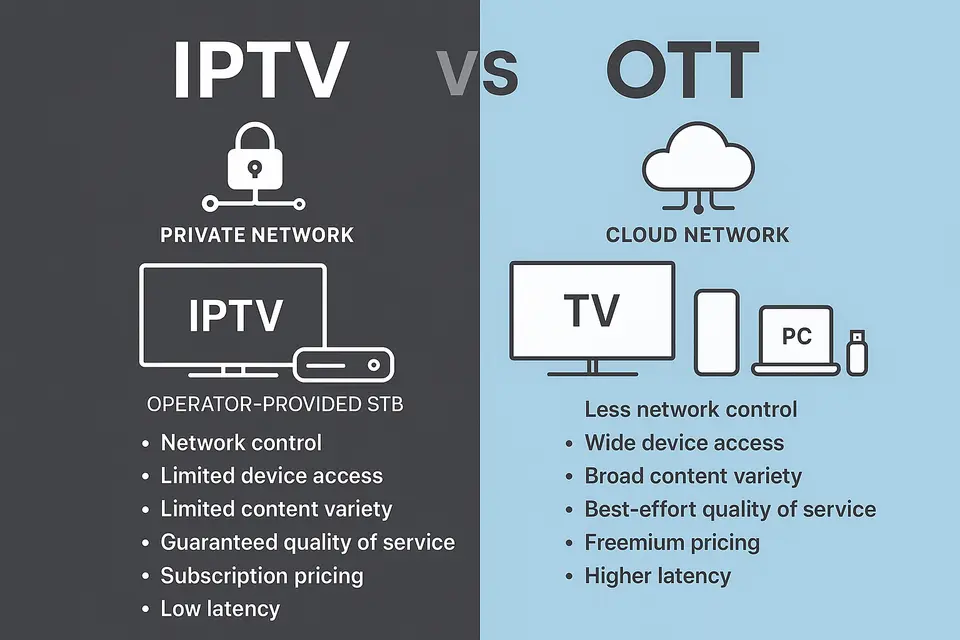
Key IPTV vs OTT Differences Comparison

Aspect IPTV OTT
Network Private, managed by telecom/ISP Public internet, cloud/CDNs
Devices Operator STB, IPTV-enabled TVs Smart TVs, phones, tablets, PCs, consoles, streaming sticks
Access Usually tied to home broadband or specific locations Anywhere with internet; cross-device reach
Content Linear live TV + VOD; curated bundles like cable On-demand libraries, live events, niche apps; more global variety
QoS High, predictable quality, minimal buffering Variable; depends on user connection and CDN
Latency Sub-second to very low, ideal for live sports Typically 10-30s; low-latency protocols can reach 2-5s
Scalability Limited by operator infrastructure and geography Highly scalable globally via cloud/CDNs
Pricing Monthly TV packages, often contracts and bundles Subscription, freemium, or ad-supported; flexible cancellations

This comparison illuminates household preferences in viewing approaches. While IPTV offers steady performance for those who lean towards live television, OTT caters to those seeking freedom in content variety.

For further insights, explore our comprehensive analyses: Read More.

IPTV Advantages and Disadvantages

IPTV Benefits

  • Reliability: Managed bandwidth ensures minimal buffering and high-quality viewing.
  • Live TV Performance: Ideal for real-time events due to ultra-low latency.
  • Structured Bundles: Offering a traditional linear experience with reliable content standards.
  • Control: Enhanced security and content management for enterprise settings.

IPTV Limitations

  • Hardware Needs: Requires specific equipment, limiting flexibility.
  • Location Restrictions: Service usually tied to specific broadband subscriptions.
  • Contracts: Often comes with installations fees and long-term commitments.
  • Geographic Limits: Availability often restricted to certain regions.

The choice rests on weighing these factors against personal viewing priorities. For deeper insights on IPTV realities, click here.

OTT Streaming Pros and Cons

OTT Advantages

  • Device Compatibility: Seamlessly integrates with nearly all internet-connected devices.
  • Global Presence: Rapid expansion due to cloud technology.
  • Variety: Access to a wide array of content from major films to niche offerings.
  • Flexible Plans: Ad-supported options and easy cancellation policies.

OTT Disadvantages

  • Quality Inconsistency: Dependent on user connection and conditions.
  • Latency Delays: Generally higher than IPTV for live content.
  • Fragmentation: Content often spread across various platforms.
  • Geographic Restrictions: Licensing can lead to different catalogs by location.

Finding a balance between flexibility and quality is pivotal for viewers. Learn more about these dynamics in our sources here.

IPTV Setup Guide for 2025

Checking IPTV Availability

Begin by ascertaining the availability of IPTV packages from local telecom or cable providers. Major services like Verizon and AT&T typically offer legitimate IPTV options. Direct contact with providers or checking their websites will clarify service provisions.

Required IPTV Hardware

  • Set-Top Box (STB): Essential for decoding IPTV signals, this device connects to your television.
  • Router/Modem: Required for a high-speed internet connection, typically meeting specific bandwidth standards.
  • Network Connections: Stable, wired connections using Ethernet cables are advised over Wi-Fi.

For hardware recommendations, check our buying guide.

IPTV Service Activation Process

  1. Contact your provider to order an IPTV package.
  2. Schedule installation or receive a self-install kit.
  3. Connect the STB to the router with an Ethernet cable.
  4. Link the STB to your TV using an HDMI cable.
  5. Follow the on-screen activation prompts using the provided credentials.
  6. Complete the necessary setup and channel scanning.

M3U Playlist Configuration

For enterprise applications, M3U playlists may come into play. Here’s how to set them up:

  • Input your provider’s official server URL and login credentials in the IPTV app.
  • Import the M3U playlist link to access available channels.
  • Avoid sourcing from unverified “free” links that commonly promote illegal content.

For channel management tips, visit our management guide.

OTT Streaming Setup Instructions

Selecting OTT Devices

OTT services are accessible through various devices:

  • Smart TVs: These include built-in apps on Samsung, LG, Microsoft brands, etc.
  • Streaming Devices: Roku, Amazon Fire TV Stick, and similar gadgets enhance capabilities.
  • Gaming Consoles: PlayStation and Xbox support a variety of streaming apps.
  • Mobile Devices: Smartphones and tablets across operating systems.
  • Computers: Windows, macOS, and Linux systems allow access through browsers or applications.

Installing OTT Applications

Download necessary streaming apps through official app stores:

  • Utilize app stores for your devices (Google Play, Apple App Store).
  • Search for primary services such as Netflix and Hulu.
  • Install sport-specific applications based on interests.
  • Incorporate niche platforms as necessary.

For device-specific guidance, especially for on Firestick, refer to our Firestick guide.

Account Creation and Management

  1. Create a user account with your email and a secure password.
  2. Select your subscription tier (resolution and ad preferences).
  3. Set up profiles for different users within the household.
  4. Establish parental controls and view preferences.
  5. Create watchlists for easier access to content.
  6. Opt-in for notifications regarding new content.

For security tips on managing accounts, click here.

Troubleshooting Common IPTV Issues

IPTV Signal and Connection Problems

  • Check Connections: Ensure all cables are properly connected and functional.
  • Restart Equipment: Power cycle your devices sequentially to reset potential issues.
  • Monitor Bandwidth: Confirm that other devices aren’t consuming excessive data during streaming.
  • Service Status: Contact your provider to verify if there are service outages.

For more detailed troubleshooting advice, refer to our guide here.

Set-Top Box and Software Issues

  • Update Firmware: Ensure your STB has the latest software installed.
  • Reset Defaults: Factory reset if issues persist after updates.
  • Check Account Status: Ensure your subscription remains active.
  • MAC Address: Verify that your MAC address is registered correctly.

For more insights visit this article.

Resolving OTT Streaming Problems

Buffering and Quality Issues

  • Test Speed: Ensure your internet connection meets minimum requirements.
  • Switch Connections: Opt for Ethernet over Wi-Fi whenever feasible.
  • Reduce Congestion: Avoid other bandwidth-heavy activities during streaming.
  • Restart Routers: Reboot your networking devices to clear any potential issues.

To understand how to interpret speeds effectively, refer to our speed testing guide here.

Application and Device Troubleshooting

  • Update Apps: Keep your streaming applications regularly updated.
  • Clear Cache: Regularly delete app data to improve performance.
  • Reinstall Apps: Refresh apps that consistently malfunction.
  • Update Device Software: Ensure your device’s firmware is up-to-date.

Account and Access Issues

Be mindful of geographical restrictions that might interfere with your viewing experience. Avoid using unauthorized methods to bypass these limitations.

For more comprehensive guidance, you can visit this article.

Content Quality and Availability in 2025

4K HDR Streaming Capabilities

Both IPTV and OTT technologies offer the capability for 4K HDR content. Typically, OTT platforms boast larger libraries; however, IPTV often focuses on 4K offerings centered around premium content such as sports.

Live Sports Latency Comparison

When it comes to live sports, IPTV maintains an edge due to its low latency. In contrast, OTT usually presents a noticeable delay, impacting real-time interactions like sports betting.

Regional Content and Licensing

IPTV often has stronger local coverage due to regional licensing agreements. In contrast, OTT services experience greater variability based on extensive licensing complexities per country.

For more details, refer to our analysis on content availability here.

Cost Analysis: IPTV vs OTT Value

IPTV Pricing Structure

Consider several elements influencing the overall IPTV cost:

  • Upfront Costs: Installation and hardware rental fees contribute to initial expenses.
  • Monthly Fees: Standard package pricing complemented by premium channel options.
  • Contractual Obligations: Many services require long-term commitments with penalties for early termination.
  • Discounts for Bundles: Combining services may offer reduced pricing.

OTT Cost Considerations

Conversely, in OTT spaces, costs often remain flexible but may accumulate:

  • One-Time Device Costs: If necessary, initial investments in a smart streaming device.
  • Multiple Subscriptions: Managing several streaming services can result in compounded monthly expenditures.
  • Flexibility: Ad-supported models allow for cost-effective viewing options.
  • No Contractual Hurdles: Much easier to switch or cancel services without penalties.

Ultimately, cost varies based on viewing habits. For more insights on pricing, you can view this source.

Choosing Between IPTV and OTT

Live Sports Priority Scenarios

For dedicated sports enthusiasts focusing on live viewing, IPTV is typically a better fit. Meanwhile, if mobility and device flexibility are prioritized, OTT may harmonize better with your lifestyle.

International Content Access

IPTV excels at ensuring local channel offerings, while OTT platforms provide extensive global content libraries. Your choice will depend on where content variety is most essential.

Flexibility vs Reliability Trade-offs

For those wanting expanded flexibility, OTT services stand out due to their operational versatility and subscription model. Alternatively, IPTV tends to cater to users looking for dependability.

Consider exploring how a combined approach could maximize your viewing. More details about alternatives are available here.

Legitimate Service Verification

Ensure that your chosen IPTV and OTT providers maintain appropriate licensing agreements. Legal IPTV services are typically offered through major carriers or regulated platforms. Avoid services promising low prices that claim to provide all channels, as they may engage in piracy.

Security and Privacy Protection

  • Strong Passwords: Use unique, complex passwords for each account.
  • Two-Factor Authentication: Enable where possible for added security.
  • Official Apps: Only download applications from trusted sources.
  • Regular Updates: Keep your devices’ software updated.

Parental Control Implementation

Most services offer mechanisms for content filtering and access restrictions. Customize parental controls according to your family’s viewing preferences.

For in-depth discussions on IPTV legality and provider security, refer to this guide.

Common IPTV vs OTT Misconceptions

Several myths continue to mislead consumers when understanding the IPTV and OTT technologies:

  • “IPTV is illegal”: Not all IPTV services are illegal; legitimate providers operate under proper agreements.
  • “OTT cannot offer live TV”: Many OTT platforms indeed provide live streaming options.
  • “IPTV never buffers”: While it generally performs better, buffering can occur.
  • “OTT quality is inferior”: Quality can compete strongly depending on internet capacity.
  • “You must choose one”: Many users effectively leverage both services for maximum benefit.

To learn more, read our detailed articles on misconceptions in this field here.

Frequently Asked Questions

Do I need a smart TV for OTT services?

No smart TV is required for OTT streaming. Any television with an HDMI input can use OTT services through external streaming devices like Roku, Fire TV Stick, or Apple TV. Mobile devices, tablets, and computers also provide full access to streaming platforms.

Is IPTV legal to use?

Legitimate IPTV services from licensed telecommunications companies and authorized providers are completely legal. Piracy occurs through unauthorized IPTV feeds that distribute copyrighted content without proper licensing agreements.

Can I use both IPTV and OTT together?

Absolutely. Many households maintain IPTV subscriptions for reliable live access while adding OTT services for movies and niche content.

Which technology works better for travel and mobile viewing?

OTT services excel for travel and mobile use because they work on any internet-connected device worldwide. IPTV services typically restrict access to specific locations and require operator-provided hardware.

Which offers better 4K HDR streaming quality?

Both technologies can deliver excellent 4K HDR content when properly configured. OTT platforms generally offer larger 4K content libraries, while IPTV providers may limit 4K to premium channels.

Leave a Reply

Your email address will not be published. Required fields are marked *

This site uses Akismet to reduce spam. Learn how your comment data is processed.

âš½ 2026 SPECIAL

WORLD CUP DEAL

watch every match without limits on IPVOS.COM

3 Months
+1 Month FREE
6 Months
+2 Months FREE
12 Months
+3 Months FREE
offer ends in --
CLAIM YOUR BONUS
code: WORLDCUP
★★★★★ rated 4.8 on Trustpilot
Offer valid for new subscribers and single-device plans only.

flexible & affordable plans

Every plan includes a 7-day money back guarantee

24-Hour Free trial available on Telegram only.